Word Search Explorer
- 4.9
- Rating
- 100.00M
- Installs
- Free
- Price

 Analysis by App-foxy
I went into Word Search Explorer expecting a familiar word-search format, but its presentation gives the simple idea a calmer, more inviting identity. It is a free word game from PlaySimple Games, designed around finding hidden words rather than managing complicated rules, and that focus makes it easy to understand within a few seconds. I could begin without learning a long tutorial or adjusting a collection of settings.
The first impression is especially friendly for players who prefer clear visual tasks. The game is listed for Everyone, works on Android 8.0 and later, and its senior-friendly positioning is reflected in the relaxed way the puzzles are presented. I would recommend trying it on a phone with a reasonably comfortable screen, because tracing letters is much more pleasant when the grid does not feel cramped. On a small display, the same simplicity can become slightly fiddly.
Its popularity also gives some useful context. The game has passed 50 million installs and holds a 4.9 average from around 1 million ratings, which suggests that the basic format has connected with a very large audience. Those figures do not replace personal testing, though. A player who wants fast action, competitive pressure, or deep word-game strategy may find the experience deliberately gentle rather than exciting.
You May Also Like

 Blood Strike: 2.5 Anniversary
Blood Strike’s Loadouts Turn Every Drop Into a Tactical Gamble
A close look at Blood Strike’s custom loadouts: how fast access to signature weapons reshapes its battle royale rhythm, rewards preparation, and narrows the gap between fights.

 Pandora - Music & Podcasts
Pandora’s Music Is Easy to Start, but Harder to Recover
Pandora’s strength is its low-effort path from a seed to a station. Its weak spot is how much confidence it asks you to place in connection, setup, and quiet recovery.

 8 Ball Pool
8 Ball Pool Is Built on Rivalries, Rematches, and Routine
A close look at the rivalries, rematches, shared routines, and unanswered safety questions that turn a quick pool match into a persistent mobile community.

 Samsung Music
Samsung Music’s Quiet Strength Is Playing What You Already Own
Its reach comes less from spectacle than from dependable access to a personal library. That simplicity is both the app’s strongest retention engine and its ceiling.

 AccuWeather: Weather Radar
AccuWeather Review: A Quick, Clear Forecast for Everyday Decisions
For everyday plans, the best forecast is the one you can understand quickly. AccuWeather makes rain timing, radar, and local conditions easy to act on, with a few trade-offs.

 Hill Climb Racing
Why Hill Climb Racing Still Turns Crashes Into One More Run
A tiny car, a bumpy hill and one more upgrade: Hill Climb Racing keeps resurfacing because its simple chaos makes every near-miss feel personal.
More From Our News Desk



A calm word-search journey built from visual cues
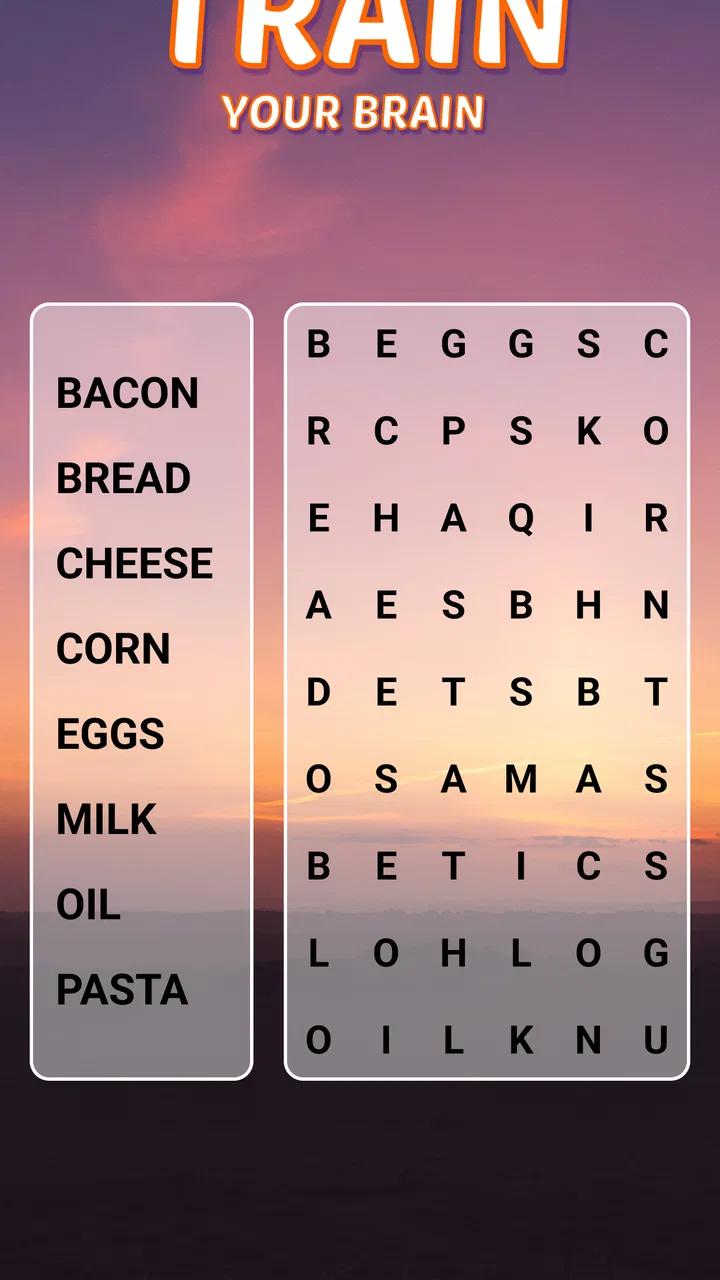
I find the appeal here less about racing through puzzles and more about settling into a clear visual task. The way the game frames its word searches gives me a reason to return for a short, quiet session, while the grid remains the main event. That balance also makes it worth looking closely at how its presentation supports the basic puzzle rather than changing it.
The setting is carried by presentation rather than story
The “Explorer” identity is important because it gives the puzzles a sense of movement from one activity to the next, even though the central interaction remains a word search. I did not approach it as a narrative adventure with characters or a complex plot. Instead, the feeling comes from the way each puzzle is framed: the artwork and changing visual context make the routine of scanning letters feel more like a small journey than a blank worksheet.
That choice works best when I want a quiet game to fill a few spare minutes. The visual direction helps separate one session from another, while the letters remain the main subject. This balance matters. If the backgrounds were too busy, they would compete with the grid; if everything looked identical, the progress would feel flat. Here, the presentation gives the activity a recognizable mood without turning the decoration into the game itself.
I also noticed that the visual approach suits players who may not enjoy noisy or overly animated mobile games. The experience feels more like sitting down with a puzzle book than entering a crowded arcade. That makes it a sensible option for an older relative, a relaxed evening routine, or a short break when I want to concentrate on one small task instead of reacting to constant events.
There is a trade-off in this design. Players who expect the setting to change the rules, introduce exploration choices, or reveal a substantial story may feel that the theme is mostly a layer around the puzzle. I think that is fair criticism. The world language supports the word search, but it does not replace it. The game’s success depends on whether you enjoy that focused activity in the first place.
Why the artwork helps the grid feel approachable
Good word-search design is not only about hiding words. It is also about making the player comfortable enough to keep looking. The visual treatment gives the grid a softer context, which helps the game feel less like a test. I found that useful when I wanted to play without worrying about failure or performance. The overall mood encourages observation rather than frantic tapping.
My practical advice is to play with the screen brightness and viewing angle that make the letters easiest to distinguish. The themed artwork is pleasant, but the grid should always win the visual hierarchy. If your eyes tire quickly, a larger phone or tablet-style screen will probably make a bigger difference than any in-game habit. I would also avoid rushing through a puzzle simply because the game is easy to start; a slower scan is part of what makes this format relaxing.
Sound and rhythm keep the experience from becoming mechanical
The audio presentation is most effective when it stays in the background. In a game built around looking carefully, sound should support the rhythm of discovery rather than interrupt it. The result feels suited to short, repeatable sessions: scan a line, notice a possible pattern, trace the word, and continue. That loop has a gentle cadence, especially when I play without trying to turn every puzzle into a speed challenge.
This is also where personal preference matters. Some players will enjoy the added sense of feedback that sound brings, while others will want to mute the game and use it as a quiet visual exercise. I see the ability to treat it either way as important. It can fit a living-room break, a waiting period, or a calm morning routine without demanding the full attention that a fast action game would require.
The pacing is intentionally unhurried. There is no need to memorize a complicated control scheme, and the main mental effort comes from visual scanning and vocabulary recognition. That makes the game approachable for casual players, but it can also make longer sessions feel repetitive. I would not choose it when I want a strong dramatic arc. I would choose it when I want a predictable rhythm that I can stop and resume easily.
How the core mechanics fit the mood
The central mechanic is straightforward: search the letter arrangement and identify the hidden words. That simplicity is a strength because the player can concentrate on the act of spotting patterns rather than learning systems. For me, the most satisfying moment is not the final completion screen; it is the instant when an apparently random sequence suddenly becomes obvious and the whole word seems to stand out.
It is worth approaching each board with a method instead of dragging randomly. I usually begin by checking distinctive letters, then scan in several directions rather than reading only from left to right. Long words can be easier to find by locating their unusual ending or starting letter first. When I am stuck, I stop staring at the entire grid and divide it into smaller areas. That simple change prevents the letters from blending together.
Another useful habit is to keep a mental note of the word list while searching. I do not try to solve every item in order. I look for the words with uncommon letter combinations first, then return to shorter or more ordinary words. This gives the session a feeling of progress and reduces the frustration that can come from repeatedly scanning the same rows.
The game’s senior-oriented design also changes how I judge the controls. A word search should not punish a player for a slightly imprecise swipe. If your finger movement is not perfectly straight, take a second attempt rather than assuming the word is wrong. A stylus or a larger screen may help players with limited dexterity, although the basic appeal remains strongest when the interaction feels comfortable rather than rushed.
Where the free model fits into everyday use
The game is free to download, which makes it easy to test without committing immediately. It includes in-app purchases ranging from $0.99 to $49.99 per item, so I would approach optional spending thoughtfully. For a casual player, the free experience may be enough to decide whether the puzzle rhythm is worth keeping. I would not purchase anything simply because a difficult board creates impatience; first I would take a break and return with a different scanning method.
This is a good example of a game that can become part of a small daily routine. Imagine having ten minutes before an appointment: instead of opening a demanding game that needs a long uninterrupted session, you can complete part of a word-search round and put the phone away. The same works after dinner, during a quiet commute when it is safe to play, or while sharing a puzzle with someone who prefers familiar activities to complex apps.
For families, the Everyone rating makes the game broadly approachable, but that does not mean every family member will enjoy it equally. A child seeking constant novelty may lose interest, while a parent or grandparent who likes word puzzles may appreciate the slower pace. I can also see it working as a shared screen activity, with one person suggesting where to search and another tracing the letters. That turns a solitary puzzle into a light conversation starter.
What separates it from ordinary alternatives
Compared with a plain word-search book, the app is more convenient because it can provide a ready-to-play puzzle without carrying paper and a pen. The digital format also makes short sessions easier: I can open it, play briefly, and leave without preparing anything. The cost structure is different, however. A printed book is a one-time purchase, while a free mobile game with optional items may encourage spending during continued use. That distinction is worth keeping in mind if you prefer fixed-cost entertainment.
Compared with crossword games, this one asks for less clue interpretation. Crosswords reward recalling definitions and fitting answers into crossing entries; Word Search Explorer is more about visual detection and word recognition. I would choose this game for relaxation or for someone who finds clues intimidating. I would choose a crossword when I want a stronger vocabulary challenge and more active reasoning about meanings.
Compared with competitive word games, it is much less stressful. There is no need to match another player’s speed or build a score around quick decisions. That is a major advantage for anyone who wants a peaceful activity, but it is also the clearest reason a competitive player may skip it. The game does not seem designed to replace a head-to-head word battle; it offers a different kind of satisfaction.
Small friction points that affect long sessions
The main limitation is repetition. Once the basic search pattern becomes familiar, the interaction can feel predictable, especially if I play for a long stretch. The changing presentation helps, but it cannot completely alter the fact that I am repeatedly scanning letters and drawing across words. I recommend treating it as a short-session game rather than expecting it to hold my attention for an entire evening.
Visual comfort is another practical concern. A crowded grid can be tiring, and a small screen may make tracing less pleasant for people with weaker eyesight or less precise touch control. That does not make the game unsuitable, but it means the device matters. Before judging the puzzles, I would test whether the text is comfortable at the distance where you normally hold your phone.
The gentle pacing can also feel too gentle. If you enjoy countdowns, dramatic obstacles, or a clear sense of escalating danger, the calm structure may seem underpowered. I would skip it in favor of a more competitive word title when my goal is pressure or measurable performance. Its best use is as a low-friction mental pastime, not as a demanding test of speed.
Who I would recommend it to
I would recommend it to people who already enjoy word searches, players looking for a visually pleasant casual game, and anyone who wants a simple activity that does not require a large time commitment. It is particularly well suited to seniors or to families choosing a game that can be understood without a lengthy explanation. The developer, PlaySimple Games, has kept the main idea accessible enough that a first-time player can begin quickly.
I would be more cautious about recommending it to someone who wants advanced word definitions, detailed language lessons, or a deep strategic system. Finding a word is not the same as learning why it is used, and the visual search itself remains the center of attention. Likewise, players who dislike optional purchases in free games should decide in advance whether they are comfortable ignoring them or setting a personal spending limit.
The current version is 1.256.0, and the game was released on November 19, 2021. Those details make it clear that this is an established title rather than a brand-new experiment. For me, that matters less than the actual fit: the game has a mature, familiar structure, and its appeal comes from consistency rather than surprise.
My atmosphere verdict after playing
What I like most is the coherence between the art direction, the sound-supported rhythm, and the uncomplicated mechanics. The setting does not overwhelm the letters, the pacing leaves room to think, and the word search remains easy to pick up. That combination gives the game a comfortable identity, especially for players who want something calmer than the usual mobile competition.
My recommendation comes with a clear condition: enjoy the search itself. If you do, the themed presentation makes repeated puzzles feel more welcoming, and the free entry point makes trying it straightforward. If you need constant novelty or a serious vocabulary workout, another category will serve you better. For everyone in between, I think this is a pleasant companion for brief breaks and relaxed routines, with enough visual character to make a familiar puzzle format feel like a small, playable journey.
FAQs for Word Search Explorer
01What is Word Search Explorer and how does it work?
Word Search Explorer is a puzzle game designed to challenge your vocabulary and cognitive skills. Players are tasked with finding hidden words in a grid, either vertically, horizontally, or diagonally. The app offers various levels of difficulty, themes, and categories, ensuring a fresh and engaging experience for all ages.
02Is Word Search Explorer free to play?
Yes, Word Search Explorer is free to download and play. However, it offers in-app purchases for additional features such as hints, ad removal, and premium themes. These purchases are optional, and players can enjoy the basic version without spending money.
03What platforms is Word Search Explorer available on?
Word Search Explorer is available on both Android and iOS platforms. Users can download it from the Google Play Store or the Apple App Store, ensuring access to a broad audience of smartphone and tablet users. It supports most modern devices, providing a seamless gaming experience.
04Does Word Search Explorer require an internet connection?
Word Search Explorer does not require an internet connection for basic gameplay, making it ideal for offline use. However, some features such as updates, in-app purchases, and certain ad-related content may require connectivity. Offline play ensures you can enjoy the game anytime, anywhere.
05Are there any ads in Word Search Explorer, and how can they be removed?
Yes, the free version of Word Search Explorer includes ads. These can be removed by purchasing the ad-free version through an in-app purchase. This upgrade not only enhances the gaming experience by eliminating interruptions but also supports the developers in maintaining and improving the app.
Pros
- Engaging puzzles for all ages.
- Variety of themes and categories.
- User-friendly interface design.
- Offline play mode available.
- Regular updates with new levels.
Cons
- Contains in-app advertisements.
- Limited free hints available.
- Occasional crashes reported.
- Some puzzles repeat frequently.
- No multiplayer mode included.

Word Search Explorer
Gallery